Put your design-risk work together.

Simply Sigma is a design risk management platform for teams engineering new products. It is designed to connect requirements with DFMEA and design verification in one working environment.

Built to make a useful DFMEA and verification plan easier to create, with the requirements in view.

For product development teams and the engineering leaders responsible for design readiness.

Keep the engineering context in view.

Putting a DFMEA together takes experienced engineers and time. When the test plan lives elsewhere, the team also has to reconstruct why each test belongs and which requirements or risks it addresses.

A useful review brings the requirement, the design risk and the planned verification into the same discussion. The aim is to make that engineering context easier to work with as the design develops.

The workflow Simply Sigma is built around

The intended workflow starts with the product requirements, uses DFMEA to examine design risk, and brings both into verification planning. A walkthrough will confirm the functionality available today for your team's work.

Requirements: start with what the product must do

Capture the performance the design must achieve, including obligations from applicable standards. These requirements feed the verification plan directly and give the risk analysis its context.

  • Required performance and operating conditions
  • Applicable standards and referenced obligations
  • Verification method and acceptance criteria
DFMEA: examine how the design could fail

Work through the design's failure modes and their effects. The team's assessment determines which risks need action; responsibility stays with the engineers.

  • Failure modes, effects and causes
  • Engineering assessment of design risk
  • Actions for the team to evaluate and follow up

DVP&R: plan how the design will be verified

Plan verification against the requirements and their referenced standards. DFMEA findings inform additional tests and test conditions. Record methods and acceptance criteria in the design verification plan and report, or DVP&R.

  • Requirement-driven verification
  • Additional tests and conditions informed by DFMEA
  • Methods, acceptance criteria and results for review

Traceability gives the work context

In the intended workflow, a test can be connected directly to a requirement, a DFMEA risk or both. Those relationships give engineers context for deciding what needs another look as the design changes.

Requirements, including obligations from applicable standards, feed verification directly. DFMEA findings also inform additional tests and test conditions.

The connected workflow

Requirements What the product must do DFMEA How the design could fail DVP&R How the design will be verified Evidence & review What the results mean for the design Context for risk analysis Additional tests and conditions Results for engineering review Requirement-driven verification
  1. Requirements
    What the product must do
    • Context for risk analysis , leads to DFMEA
    • Requirement-driven verification , leads to DVP&R (directly, not via DFMEA)
  2. DFMEA
    How the design could fail
    • Additional tests and conditions , leads to DVP&R
  3. DVP&R
    How the design will be verified
    • Results for engineering review , leads to Evidence & review
  4. Evidence & review
    What the results mean for the design

Workflow illustration · Intended connected experience

Requirements provide the context for DFMEA and feed the DVP&R directly. DFMEA findings also inform tests and conditions in the DVP&R. Verification results provide evidence for engineering review.

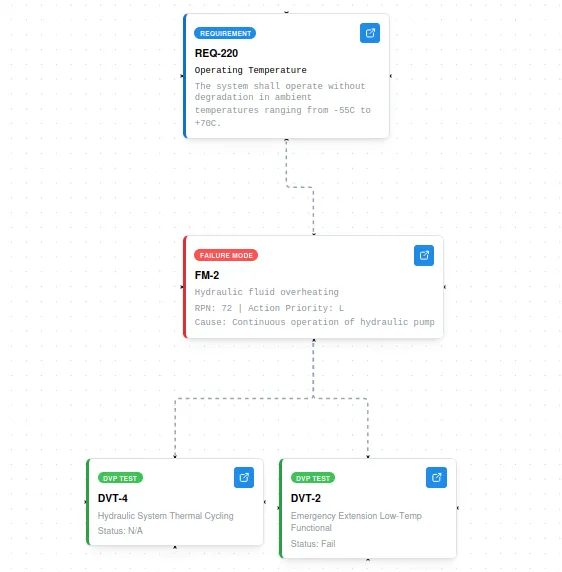
A traceability graph in the product

Traceability graph in the product: a requirement card, REQ-220 Operating Temperature, connects downward to a failure mode card, FM-2 hydraulic fluid overheating with RPN 72, which connects to two DVP test cards, DVT-4 with status not available and DVT-2 with status Fail.
Product view: traceability graph Example project data. This example runs from a requirement through a failure mode to its tests; requirement-driven verification is shown in the diagram above.

Bring the evidence into review

Review test results alongside the design risks they address. A failed test or a revised requirement gives the team a reason to revisit the affected work.

Use the walkthrough to evaluate how the available views support your reviews of requirements, DFMEA actions and verification results. Confirm which information your team needs to see and what a pilot would need to prove.

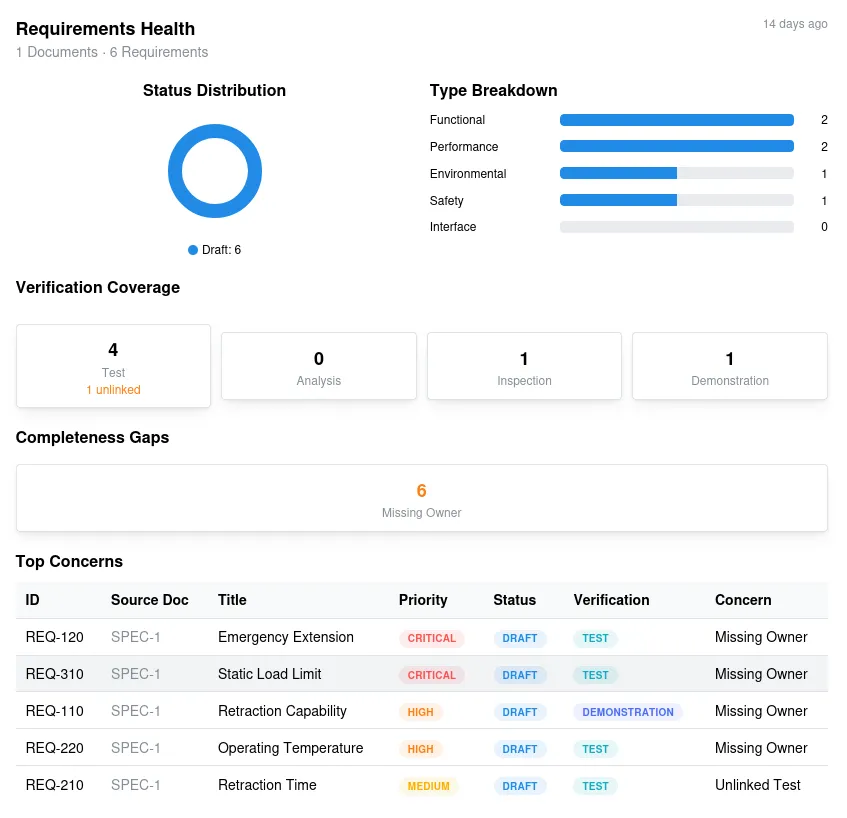
Requirements health view showing status, verification coverage and completeness summaries.
Product view: requirements health Example project data.
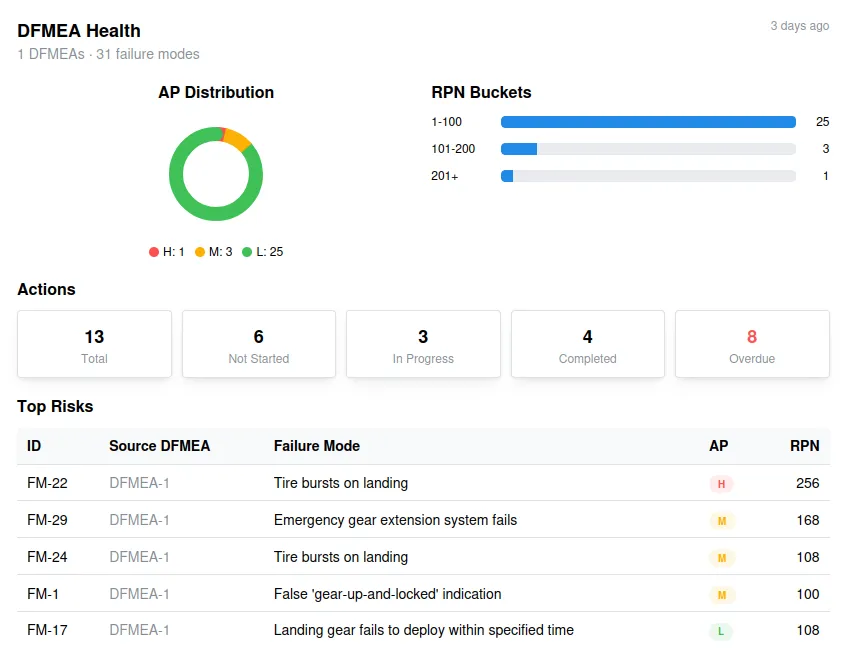
DFMEA health view showing risk-rating and action-status summaries.
Product view: DFMEA health Example project data.
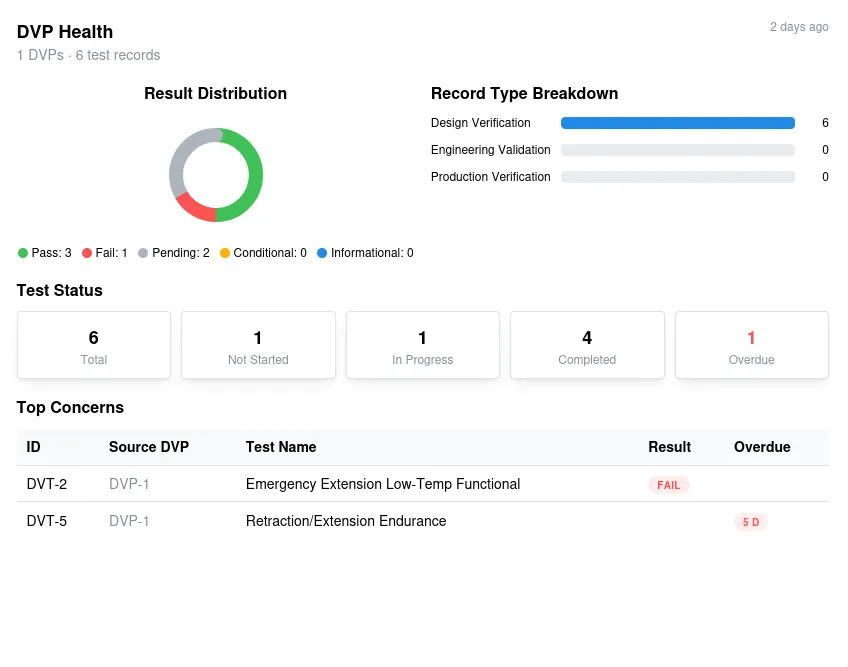
DVP health view showing test-result and test-status summaries.
Product view: verification health Example project data.

Illustrative product views using example data. Available functionality will be confirmed in the walkthrough.

Built from engineering practice

Founder Georgije Stanisic is a mechanical engineer and DFSS Black Belt with experience in hardware product development. Simply Sigma grew out of his work with DFMEAs and design verification.

Arrange a product walkthrough

Choose a product or subsystem where your team needs to build a DFMEA and verification plan. Tell us a little about the work, and we can walk through the available product and discuss what a useful pilot would need to prove.

Pilot-stage product. This website describes the intended connected workflow. Available functionality and any work needed for your pilot will be confirmed in the walkthrough.